Loads solar azimuth, declination, sun hour strength factor and climatic data at 15 minute intervals for year at selected position.
The Geography button opens the world map form and menu search options for locating and automatically loading meteorological and solar data to the current calculation for various key world locations. The form displays three menu options at the top: Select Region; Select Country; Select City.
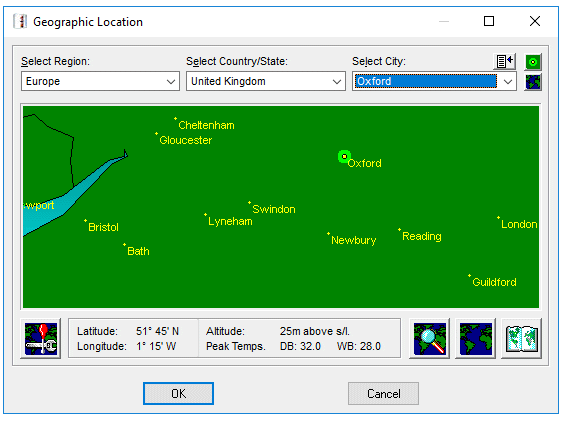
Clicking directly on the World Map will automatically enter data for the nearest city to the clicked upon location, confirmed by placing a highlighted spot on the map, at the same time the Select menu options at the top will automatically reflect the Region; Country and City corresponding to the clicked upon location. If clicking on an area of the world map does not result in a location being identified then that is because there is no data in the program's database for that specific location. Move the Mouse cursor slightly and click again until a location is found.
Alternatively, using the Search button will offer an input box to enter a city name and the program will then search for it in the database. Search text is not 'case sensitive' and, unless the Exact Match box is checked, does not have to be a complete text string in order to find a city. For example, entering stras will find:-
Region: Europe Country: France City: Strasbourg
A useful feature if unsure of precise spelling or even exact country.
Loads solar azimuth, declination, sun hour strength factor and climatic data at 15 minute intervals for year at selected position.
To the right of the Search button is a button that alternates the World Map between showing all current database locations as yellow dots and a clear (dot free) map. An aid to reviewing the extent of the current database.
At far bottom right is a button that facilitates editing or adding to the program's world database. Care must be taken when entering data to ensure that precise Latitude, Longitude and Altitude co-ordinates are known and correctly entered as the programs complex Solar tracking routines depend upon this information and small differences can result in large calculation result errors.
The program can be used to find, from a database, expected peak and minimum temperatures for various listed world locations. The database has been compiled from information in the public domain from several sources. Temperatures for various times of the day and for different days of the year are interpolations derived by complex meteorological algorithms. These interpolated temperatures are therefore estimated projections only and cannot be guaranteed, particularly when used in isolation. Interpolated temperatures when used over a time period of a month or more do though produce reasonably accurate and useful averages for that time period.
See also:-
Cartesian Projection
City (adding to database)
Solstice
Zoom function